
Overview
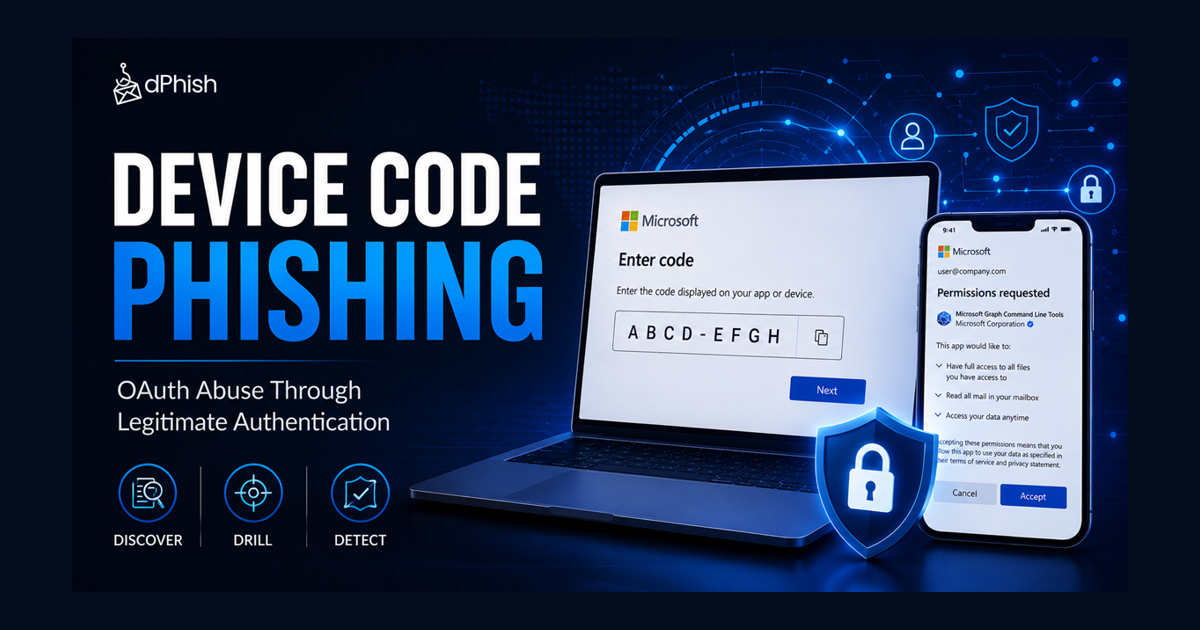
Traditional phishing campaigns rely on fake websites, typo-squatted domains, and malicious infrastructure to steal credentials. Device Code Phishing changes this approach entirely. Instead of directing victims to a fake login page, attackers abuse legitimate OAuth device authentication flows provided by trusted platforms such as Microsoft, Amazon, GitHub, and GitLab.
Because the authentication takes place on legitimate domains and the victim willingly completes the login process, many traditional phishing defenses struggle to identify the attack. This makes Device Code Phishing an increasingly attractive technique for adversaries seeking to bypass MFA and evade URL-based detections.
OAuth 2.0 and Device Code Flow
The OAuth Device Authorization Grant was originally designed for devices that have limited input capabilities, such as smart TVs, conference room systems, and IoT devices.
Why Device Code Phishing Is Effective
Unlike traditional phishing attacks, Device Code Phishing:
- Uses legitimate Microsoft domains.
- Does not require fake login pages.
- Can bypass reputation-based URL filtering.
- Relies on user interaction rather than credential theft.
- Works even when MFA is enabled because the victim performs the authentication themselves.
From the user’s perspective, everything appears normal. They visit an authentic Microsoft page and complete a standard sign-in process.
Client IDs
In OAuth 2.0, a client ID is a public identifier for an application that wants to access user resources. A dangerous aspect of device code phishing is that attackers can use the client IDs of legitimate, well-known Microsoft applications.
Client IDs can be retrieved through multiple methods. The most straightforward approach is to intercept the OAuth flow by running the legitimate application while monitoring network traffic with tools like Wireshark, Fiddler, or browser developer tools.
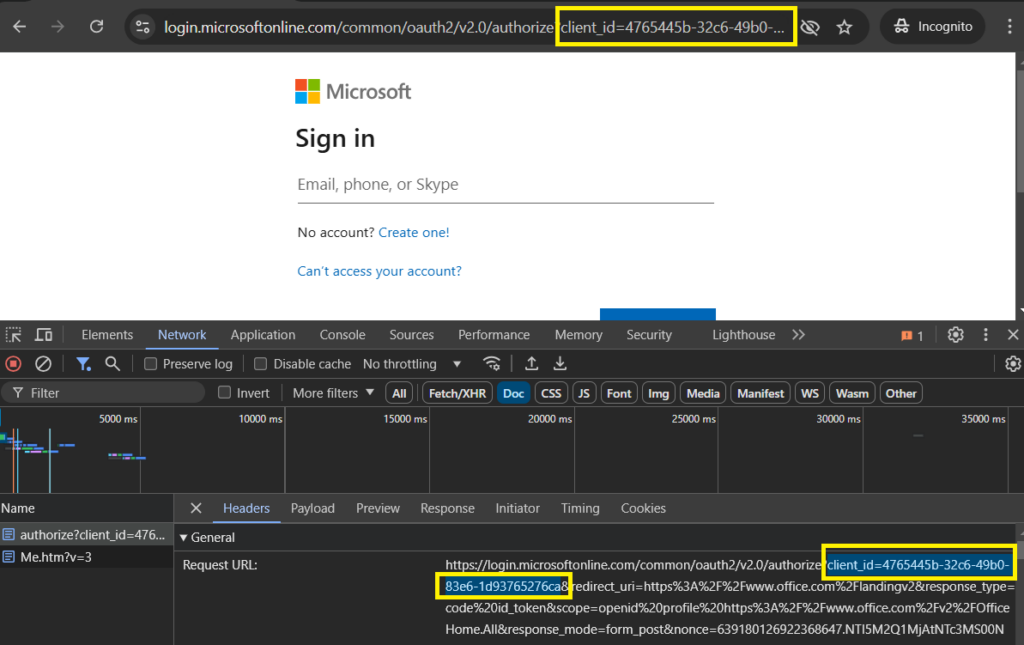
The following list contains the commonly used Client IDs:
- Microsoft Graph PowerShell uses client ID 14d82eec-204b-4c2f-b7e8-296a70dab67e. This is one of the most used client IDs in device code phishing attacks because IT administrators and security professionals regularly use Microsoft Graph PowerShell for automation and management tasks.
- Microsoft Office uses client ID 4765445b-32c6-49b0-83e6-1d93765276ca. Given that Microsoft Office is used by virtually every organization worldwide, this client ID provides maximum trust.
- Microsoft Azure PowerShell uses client ID 1950a258-227b-4e31-a9cf-717495945fc2. This client ID is particularly effective when targeting IT administrators and cloud engineers who regularly use Azure PowerShell for infrastructure management.
- Microsoft Teams uses client ID 5e3ce6c0-2b1f-4285-8d4b-75ee78787346.
Device Code Walkthrough
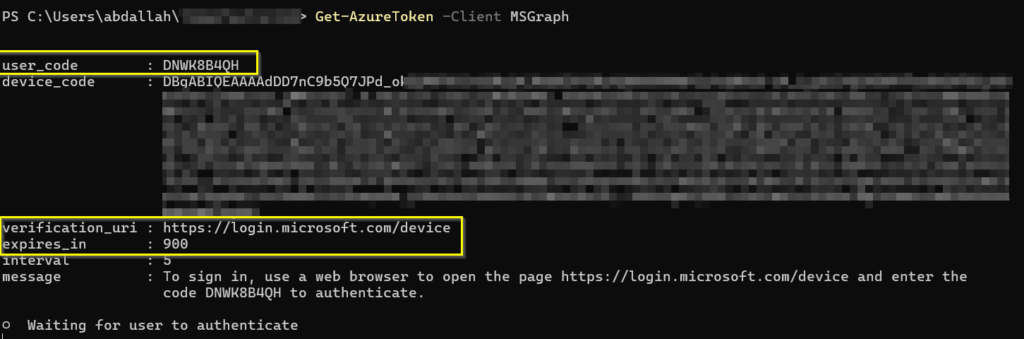
- When a constrained device needs to authenticate a user, it first requests a code from Microsoft. Microsoft then responds with a short device code, a verification URL (e.g. https://microsoft.com/devicelogin), and an expiration time, typically 15 minutes.
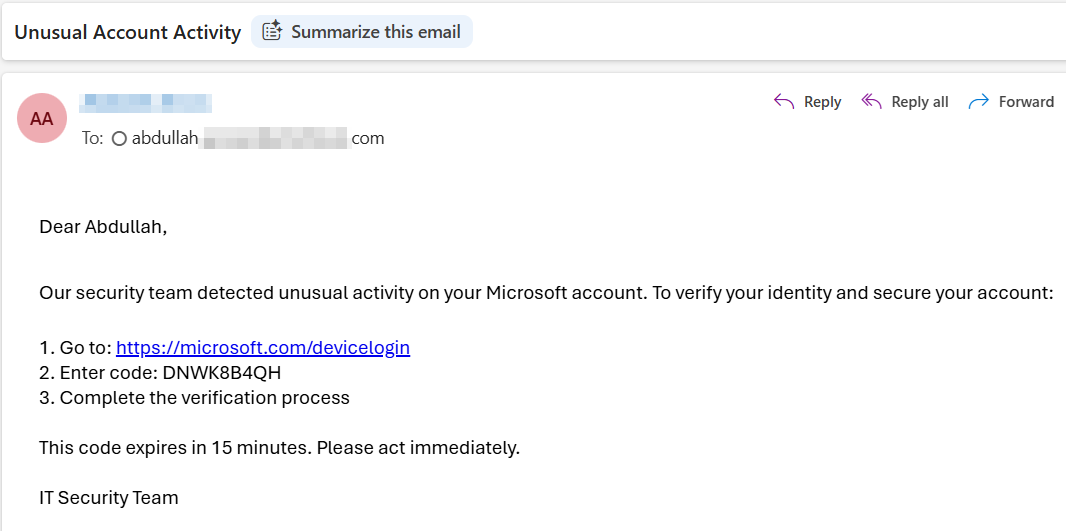
- Then the device displays instructions to the user telling them to visit the verification URL and enter the provided code. The user will then open a phone or laptop, navigate to the URL, and enter the code.
- Once the user enters the code, Microsoft prompts them to log in with their Microsoft account credentials and complete MFA. After successful authentication, Microsoft asks the user to confirm whether they want to grant access to the device, for example allowing an external app to connect to their Microsoft 365 data (e.g. OneDrive, Email, Calendar etc.).
- Once the user approves, Microsoft issues access tokens to the device within the approved scopes, completing the authentication flow.
Under normal circumstances, this process is legitimate and secure. However, attackers can abuse this workflow by generating device codes and convincing victims to complete the authentication on their behalf.
How Device Code Phishing Works?
1. Generating the User Code
First, the attacker generates a user device code:
2. Sending the code to the victim
Then, the attacker sends this code to the victim through the email asks him to complete the authentication process:
3. Tricking the victim to enter the code and allow access
When the victim reachs the page, he must enter the code and proceeds with the following process:
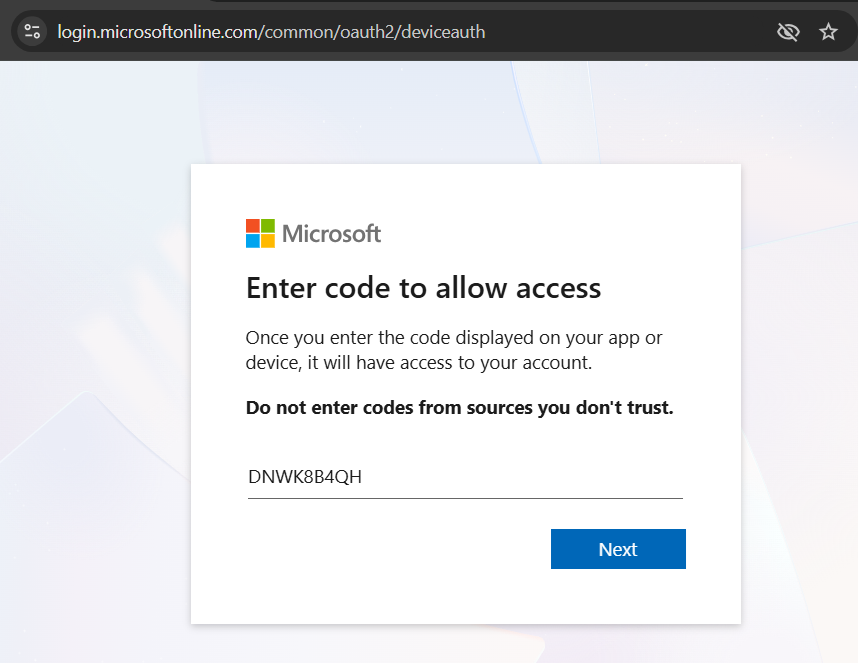
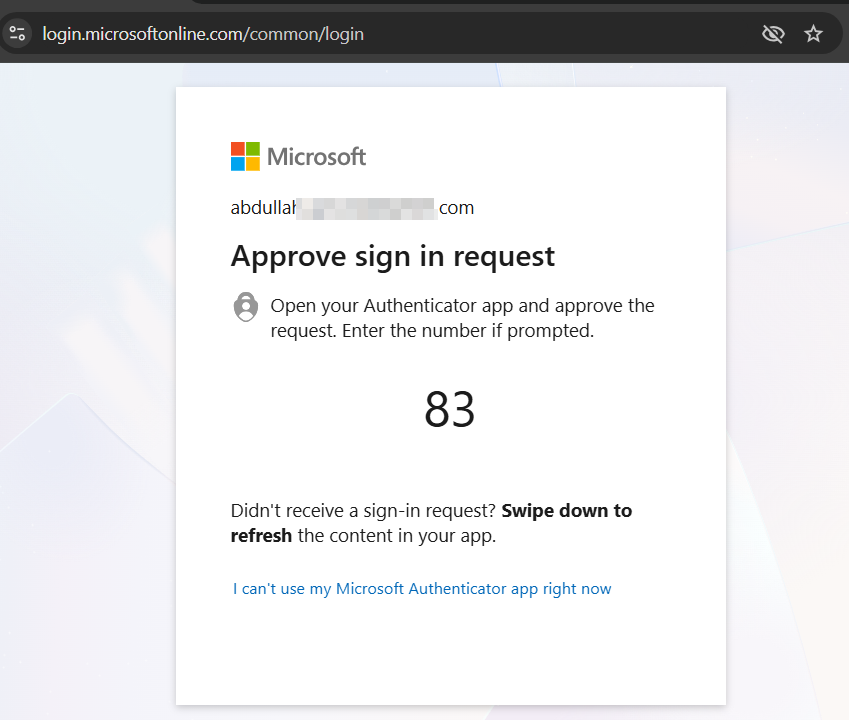
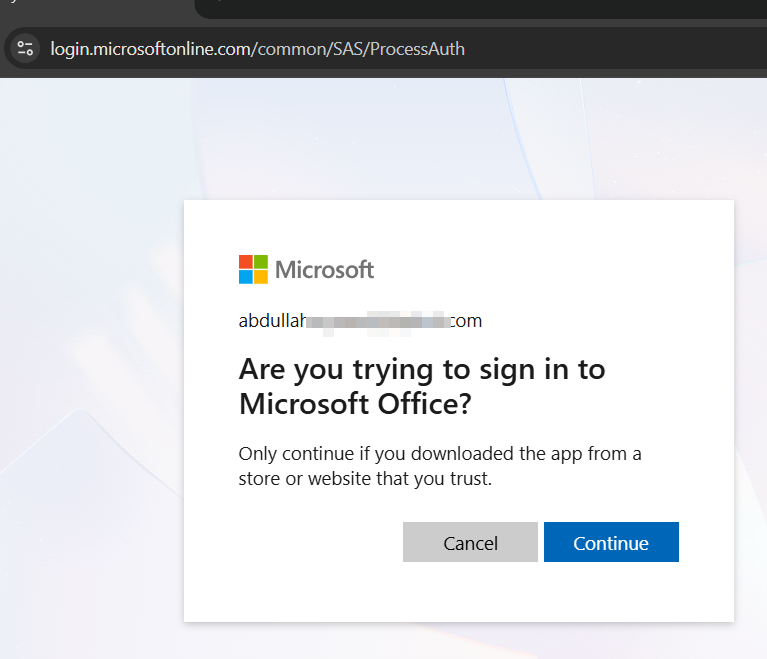
Microsoft displays the app permissions request. At this point, the victim unknowingly authorizes the attacker’s application:
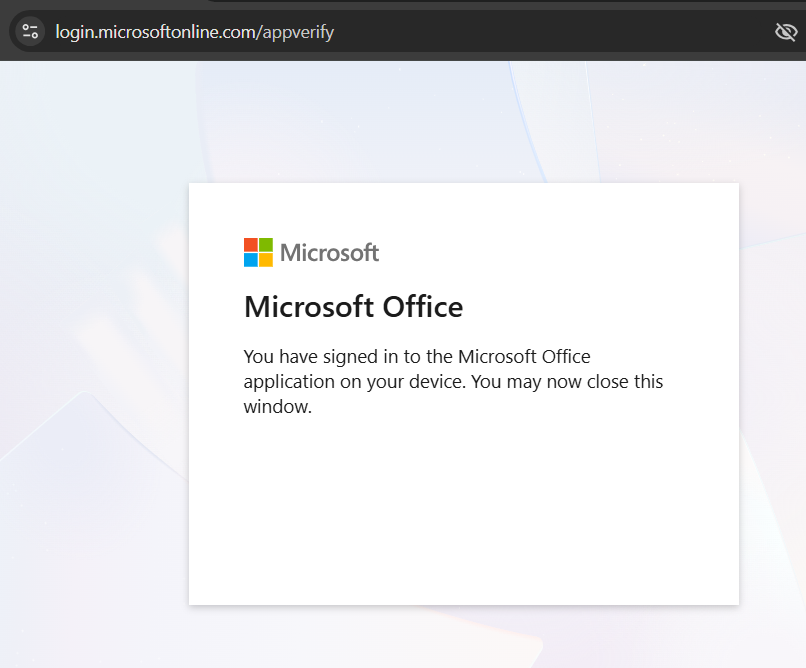
After authorization, Microsoft shows a confirmation page to the user:
4. The attacker gains access and refresh tokens:
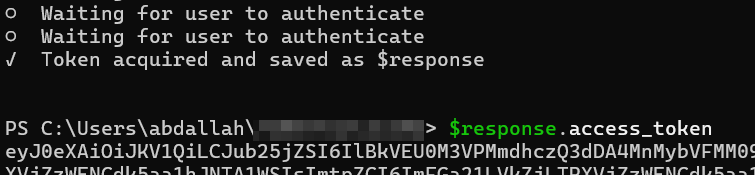
Token Usage
Once the attacker obtained the access token, he can use it directly with Microsoft Graph API using Powershell with Graph REST API, getting all victim information such as his phone number, address, name, messages and his files from OneDrive also.
Renewing Tokens
It’s worth noting that access tokens are short-lived, but can be renewed using the refresh token without requiring the victim to authenticate again. The refresh token can remain valid for a longer period, providing long-term access to the victim’s account.
Device Code Phishing Limitations
Device code phishing has several constraints that affect its execution.
- The device code expires within 15 minutes, meaning that the attacker must act quickly and the victim needs to be online and responsive during that time window.
- Access is also restricted to the permissions the target approves, the activity leaves audit trails in Microsoft logs, and conditional access policies can block the attack.
Organizational defenses can reduce this risk through Conditional Access Policies. For example, the following policy can block the use of the device code flow from any unmanaged devices by enforcing conditional access rules:
New-AzureADMSConditionalAccessPolicy -DisplayName "Block Device Code Flow" ` -State "Enabled" -Conditions $conditions -GrantControls $grantControls
This ensures that only devices meeting organizational compliance requirements can complete the device code flow.
Application Consent Policies provide another layer of defense by blocking unverified applications, requiring admin consent for sensitive permissions, and monitoring suspicious app registrations.
How do we detect Device Code Phishing by Discover?
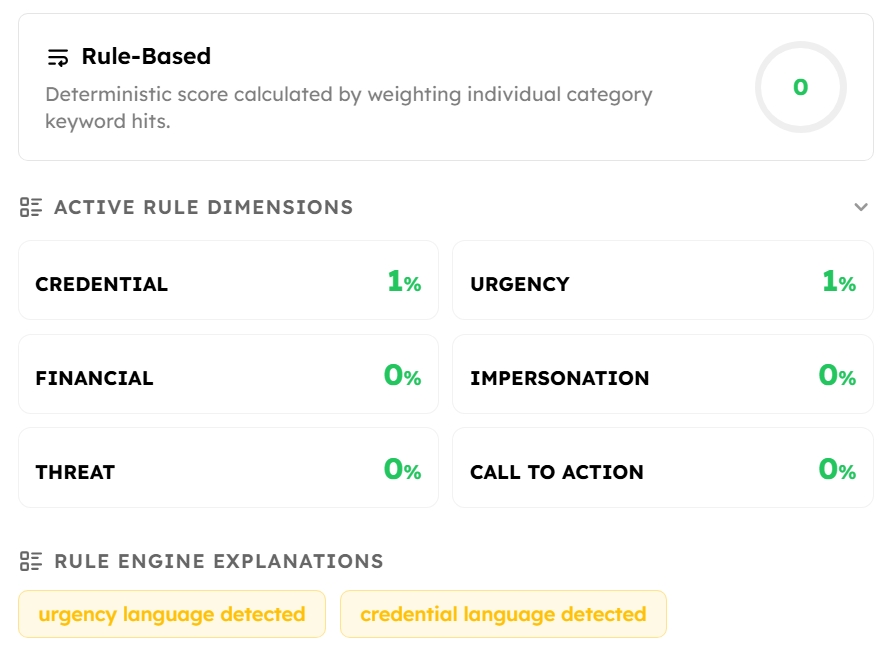
Discover can detect these types of emails through different detection layers including (Atomic Rules, AI, Classification), as shown in the images below:
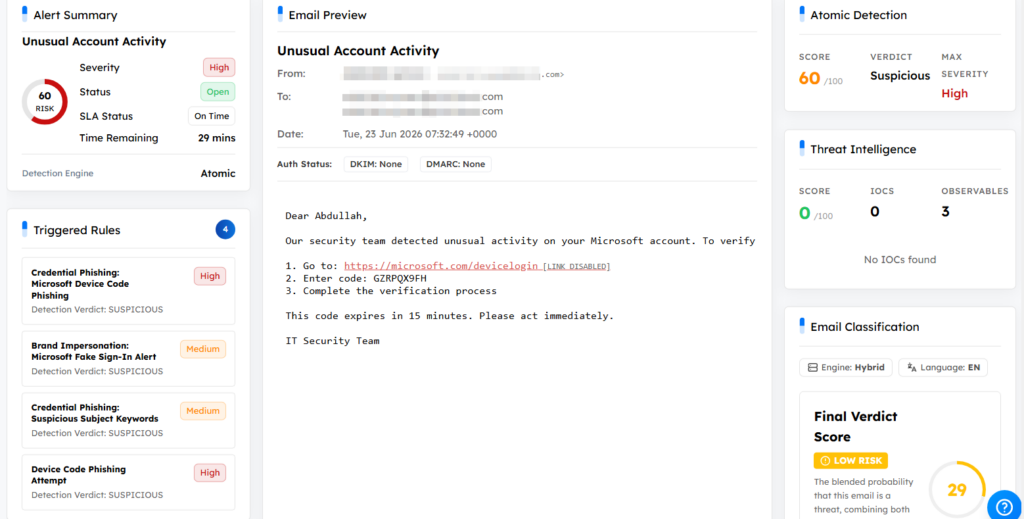
Discover Detection:
1. Logical Rules (Atomic)
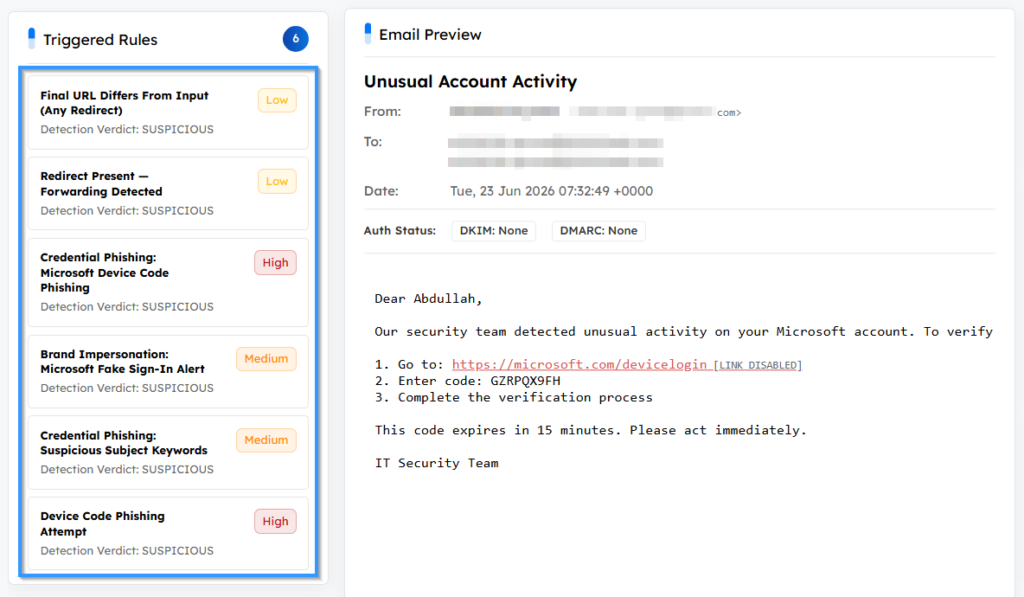
2. Machine Learning:
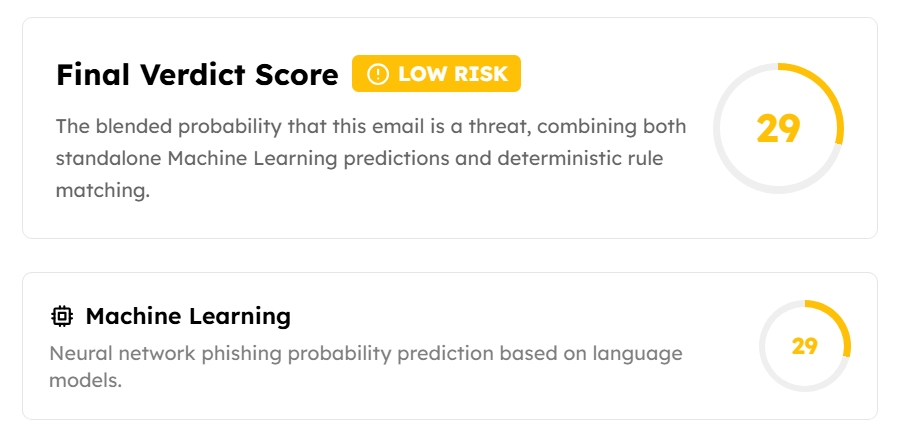
3. Classification (Credential and Urgency Languages)
Discover Rules:
Rule 1
name: “Device Code Phishing Attempt”
description: “Detects phishing emails attempting to abuse OAuth device authorization flows.”
rule_engine: “Atomic”
category: “Credential”
version: 1
score: 80
confidence: 90
severity: “High”
detection:
all:
– any:
– body_text: { regex: ‘\b[A-Z0-9]{4}-[A-Z0-9]{4}\b’ }
– body_text: { regex: ‘\b[A-Z0-9]{4}\s[A-Z0-9]{4}\b’ }
– body_text: { regex: ‘\b[A-Z0-9]{8}\b’ }
– body_text: { regex: ‘\b[A-Z0-9]{9}\b’ }
– body_text: { regex: ‘\b[A-Z0-9]{10}\b’ }
– body_text: { regex: ‘\b[A-Z0-9]{8,10}\b’ }
– body_text: { regex: ‘\b[A-Z0-9]{10,14}\b’ }
– any:
– body_text: { icontains: “/devicelogin” }
– body_text: { icontains: “device.login” }
– body_text: { icontains: “/login/device” }
– body_text: { icontains: “/oauth/device” }
– body_text: { icontains: “/a/code” }
– urls.url: { icontains: “devicelogin” }
– urls.url: { icontains: “device.login” }
– urls.url: { icontains: “/login/device” }
– urls.url: { icontains: “/oauth/device” }
– urls.url: { icontains: “/a/code” }
– any:
– classification.rules.credential_score: { gt: 0 }
– body_text: { icontains: “enter the code” }
– body_text: { icontains: “verification code” }
– body_text: { icontains: “authentication code” }
– body_text: { icontains: “device code” }
– body_text: { icontains: “authenticate” }
– body_text: { icontains: “verify” }
– body.text: { icontains: “access request” }
– any:
– classification.rules.urgency_score: { gt: 0 }
– body_text: { icontains: “urgent” }
– body_text: { icontains: “expire” }
– body_text: { icontains: “minutes” }
– body_text: { icontains: “immediately” }
– body_text: { icontains: “valid for” }
Rule 2
name: “Credential Phishing: Microsoft Device Code Phishing”
description: “Detects messages containing Microsoft device code authentication links (microsoft.com/devicelogin) combined with device code references in the body, sent from non-Microsoft domains. Used by attackers to steal OAuth tokens without needing the user’s password.”
rule_engine: “Atomic”
category: “Credential Phishing”
version: 1
attack_id: “T1566.002”
tactic_id: “TA0001”
severity: high
score: 70
detection:
all:
– any:
– agg:
any:
field: “urls.url”
iregex: “(?i)(?:microsoft\\.com/devicelogin|login\\.microsoftonline\\.com/common/oauth2/deviceauth|aka\\.ms/devicelogin)”
– any:
– body_text:
icontains: “device code”
– body_text:
iregex: “[A-Z0-9]{9}”
– not:
any:
– from:
iendswith: “microsoft.com”
– from:
iendswith: “microsoftonline.com”